Docs
Documents, AI-assisted analysis, and human review
Prepare company evidence, upload a tender, review structured findings, and trace every important result to its source.
TenderFaro Editorial Team · 9 min read · Updated 2026-09-30
Prepare the evidence library
Upload current organization evidence such as certificates, insurance, policies, and project references. Customer-uploaded evidence remains private to the organization and is different from a provider-confirmed registry result.
Start a tender analysis
Open New analysis, upload the primary tender or RFP document, review the source, and explicitly start processing. Imported public notices do not start analysis automatically, and a notice without procurement documents may require a separate upload.
How AI supports the workflow
TenderFaro uses the configured Cloudflare Workers AI provider to help interpret tender language and structure requirements. Rules and stored company data provide additional context. AI output remains reviewable decision support rather than a legal determination.
Understand finding statuses
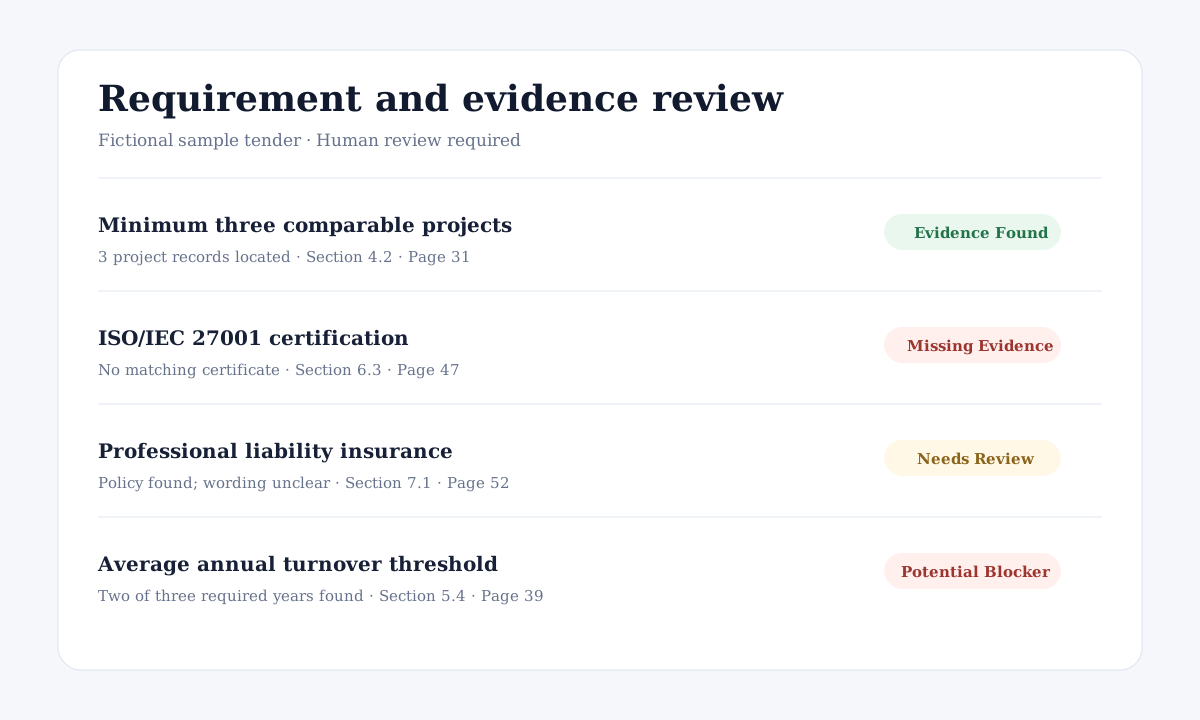
Evidence Found means relevant material was located. Missing Evidence means the available library did not contain a match. Needs Review indicates ambiguity. Potential Blocker highlights a condition that may conflict with available facts. None of these statuses guarantees eligibility.
Review sources and decide
Open the cited tender wording, inspect the linked company evidence, confirm dates and scope, and record the team's conclusion. If processing is delayed or fails, do not replace source review with an unsupported assumption.