Docs
Plans, usage, upgrades, and subscription management
Understand plan allowances, usage, confirmed upgrades, Stripe Customer Portal, cancellation, and synchronization delays.
TenderFaro Editorial Team · 8 min read · Updated 2026-09-30
Review the current plan and usage
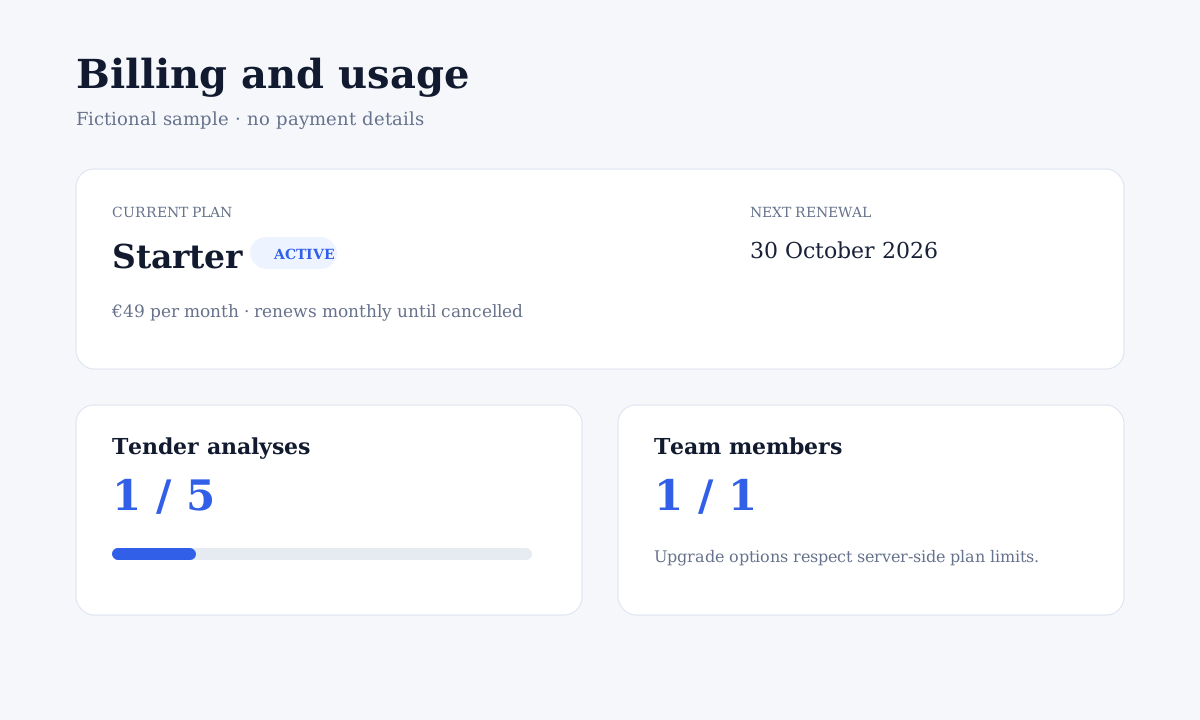
Open Billing from the avatar menu or workspace navigation. The page shows the organization plan, subscription state, renewal information, cancel-at-period-end state, tender-analysis usage, and team usage from trusted server-side billing data.
Monthly allowances
Starter includes 5 tender analyses and 1 user. Professional includes 20 analyses and 5 users. Business includes 75 analyses and 15 users. Usage remains attached to the current billing period when an upgrade is confirmed.
| Plan | Monthly price | Tender analyses | Users |
|---|---|---|---|
| Starter | €49 | 5 | 1 |
| Professional | €149 | 20 | 5 |
| Business | €399 | 75 | 15 |
Preview and confirm an upgrade
Authorized billing owners can review an eligible upgrade. Stripe calculates the unused-plan credit, prorated amount, applicable tax, next full renewal amount, and renewal date. TenderFaro does not change access when the preview opens; select Confirm upgrade to request the change.
Wait for Stripe confirmation
Existing entitlements remain active until a signed Stripe webhook confirms the updated subscription. When synchronization finishes, the plan badge, allowances, and billing page refresh without requiring a new account.
Use Stripe Customer Portal
Choose Manage Billing to open Stripe's hosted portal for invoices, payment methods, subscription management, and cancellation. TenderFaro never asks you to enter payment-card details into the workspace itself.
If payment confirmation is delayed
A completed payment can take time to synchronize. Do not purchase the same plan again. TenderFaro reconciles known Stripe records server-side; refresh later or contact support if the safe payment message remains.